HotelBarDost
HotelBarDost Lodging

Lodge & Hotel Management Software for Indian Hotels

Know which rooms are free, check guests in with their ID details, keep every charge and payment on one folio, and check out with a correct bill — on your own Windows PC, with or without internet.

₹18,000one-time licence · no subscription · no per-room fee

WhatsApp usमराठीत वाचा

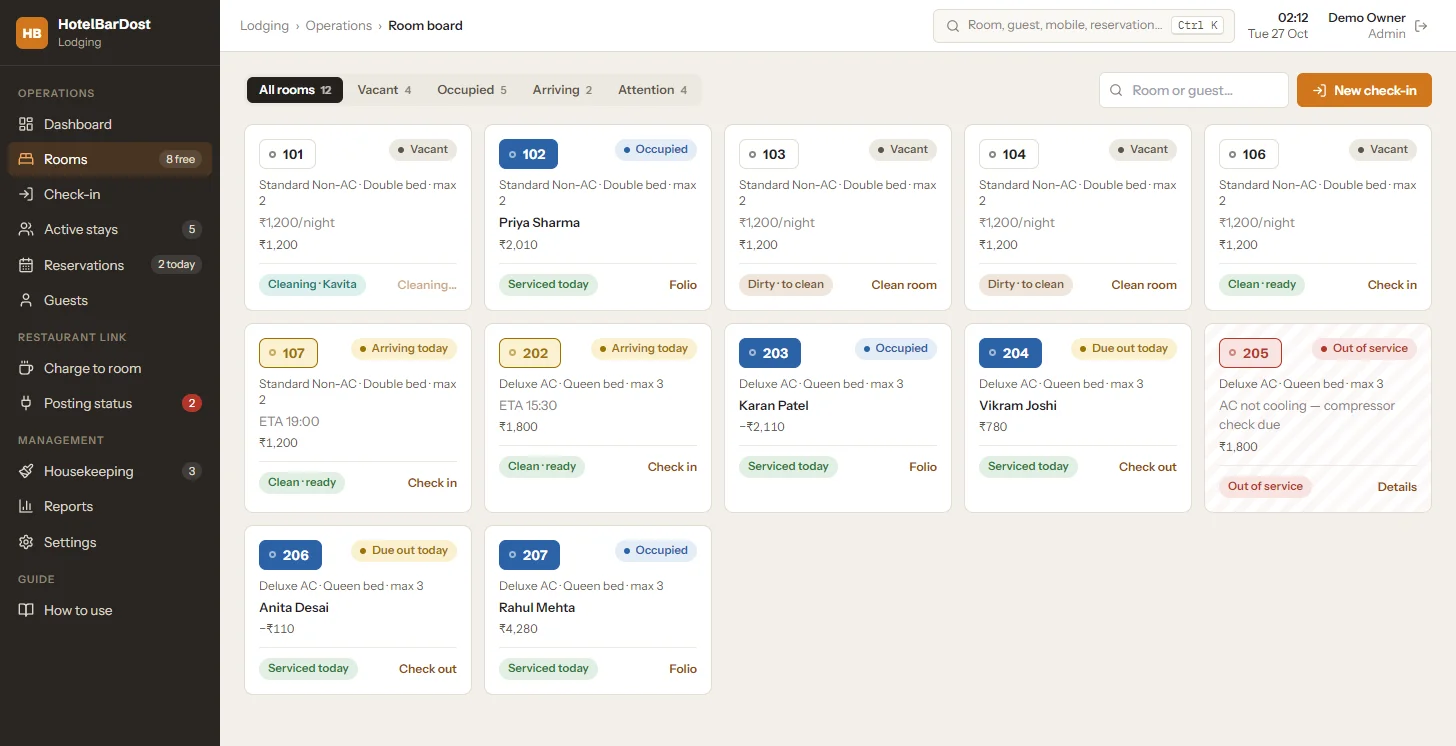
Room board
HotelBarDost Lodging room board with vacant, occupied, arriving, due-out and out-of-service rooms
Real Lodging screen, shown with sample data

HotelBarDost Lodging at a glance

Product
HotelBarDost Lodging, by Mentark Tech Private Limited
For
Lodges, budget and family-run hotels, guest houses — one property, one front-desk PC
Runs on
Windows desktop; data stored on your PC
Internet
Not needed — including ID text recognition and licence check
Price
₹18,000 one-time · POS + Lodging ₹30,000
Licence
Machine-bound — one activation per PC
Trial
7-day free trial, fully featured; live demo on request
Screens
English (demo and support also in Marathi)
Support
Phone & WhatsApp 8421470722, 9 AM – 10 PM
Who it's for

Built for properties that sell rooms every day

Lodging is designed for a single property run from one front-desk PC — from a 10-room lodge to an independent hotel with a dining room.

Independent hotels

Front desks that need a clear room board, proper guest bills and owner-level reports without a monthly subscription.

Lodges & guest houses

Small properties moving off the register book — check-in, ID details and payments recorded in one place.

Hotels with a restaurant or bar

Post outlet bills to the guest's room folio so everything is settled together at checkout.

From register book to room board

The everyday front-desk problems it solves

  • “Is 204 free or still being cleaned?” One room board shows occupancy and housekeeping state for every room.
  • Guest details copied by hand into a register Guided check-in captures the ID and pre-fills the form; returning guests are found by mobile number.
  • Room, food and advance payments on separate slips Every charge and payment lands on one folio with a running balance.
  • Checkout totals worked out on a calculator The final bill is built from posted entries — review it, collect the balance, print it.
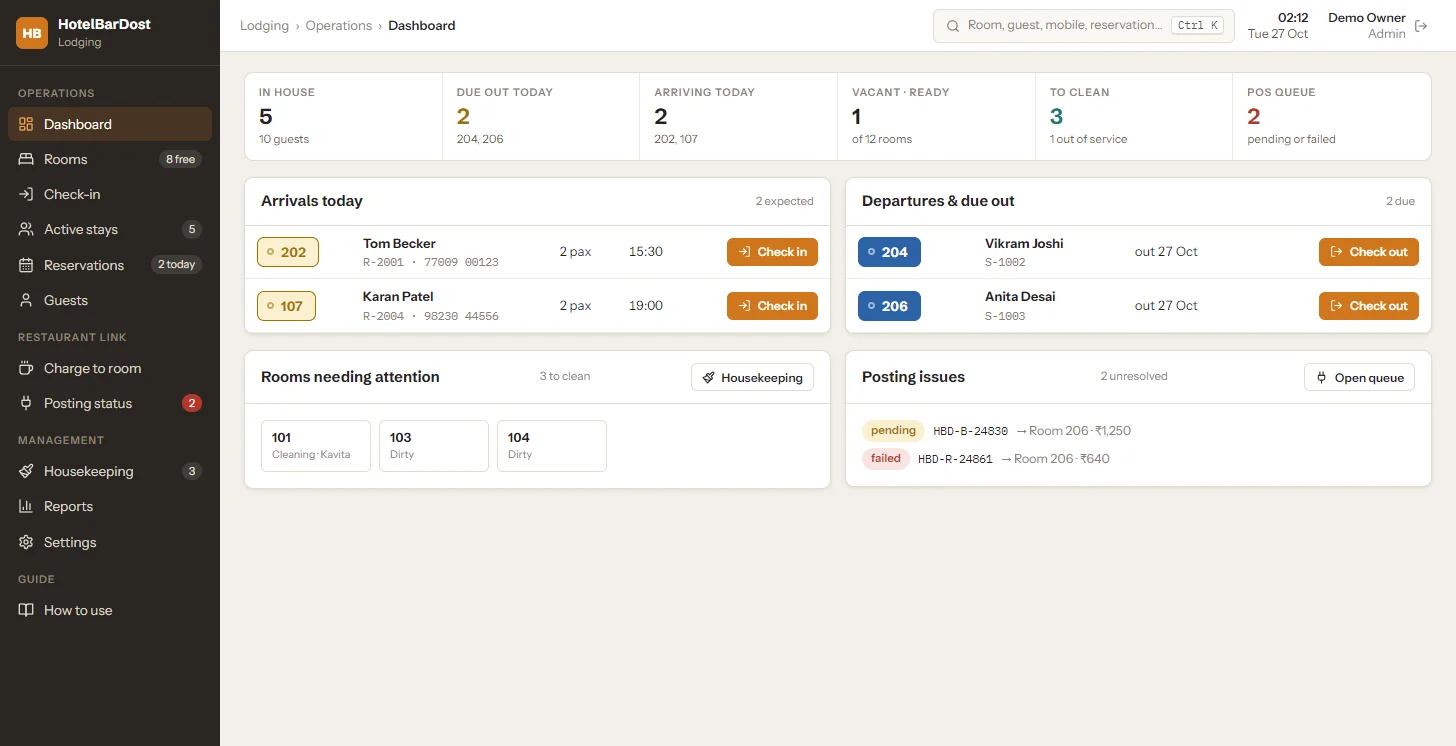
Front-desk dashboard
HotelBarDost Lodging front-desk dashboard showing guests in house, arrivals, departures and rooms to clean
Dashboard: in-house guests, arrivals, departures and rooms to clean
What's inside

Everything the front desk does, in one app

Every item below is in the current version of HotelBarDost Lodging — not a roadmap.

Room board & dashboard

See every room's status at a glance — and what needs doing today.

  • Vacant, occupied, arriving, due-out and out-of-service rooms on one board
  • Housekeeping state on every room card: dirty, cleaning or ready
  • Dashboard counts for in-house guests, arrivals, departures and rooms to clean
  • Ctrl+K search across rooms, guests, mobile numbers and reservations

Guided check-in & guest records

A step-by-step check-in that builds a searchable guest history.

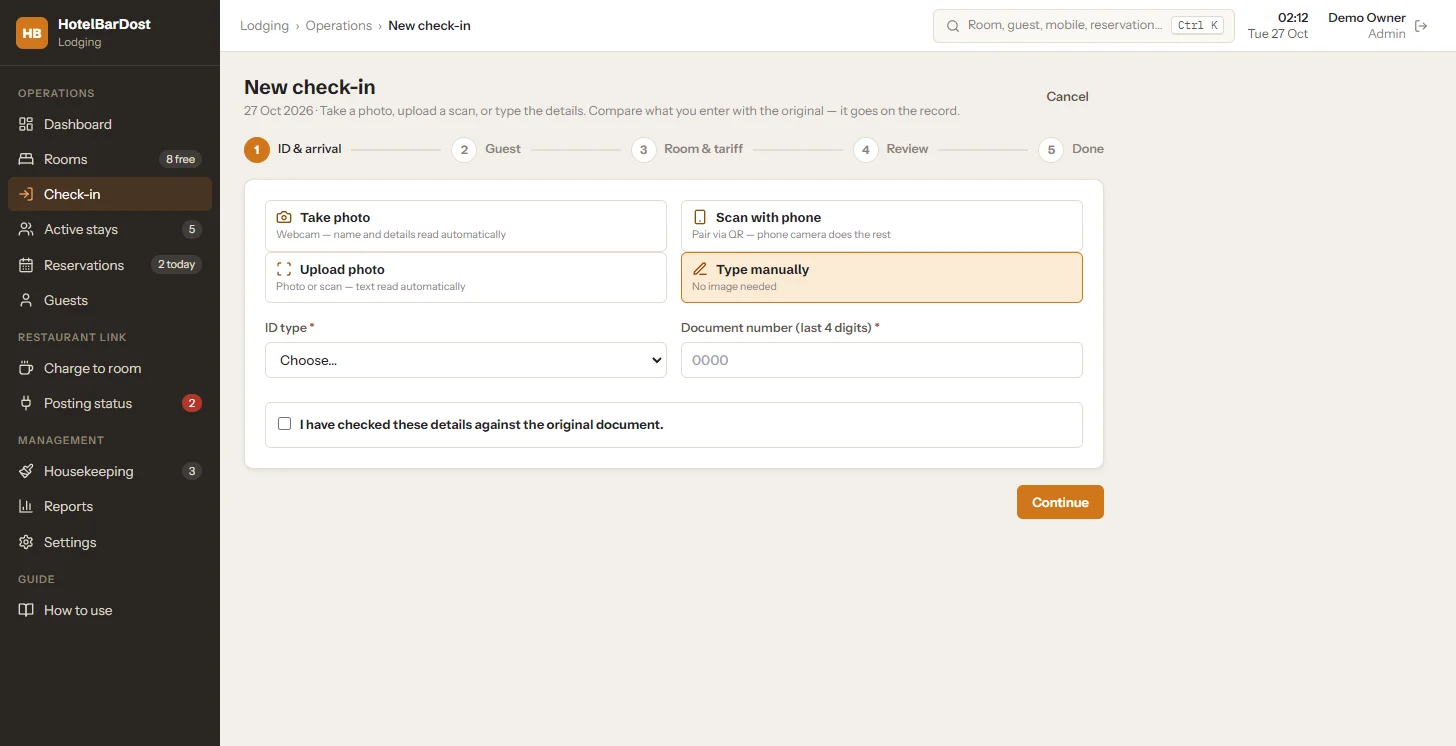
  • Five steps: ID & arrival → guest → room & tariff → review → done
  • Capture the ID by webcam, photo upload, or a phone camera paired by QR
  • Offline OCR and Aadhaar QR reading pre-fill the form — staff confirm against the original document
  • Aadhaar numbers kept as last 4 digits only; returning guests found by mobile number

Guest folio & payments

One running ledger per stay, so 'what does this guest owe?' always has an answer.

  • Room rent, GST, extras, restaurant/bar charges, advances, payments and refunds
  • Entries are never deleted — mistakes are corrected with a recorded reversal
  • Cash, UPI (with your UPI QR on screen), card and bank transfer
  • Discounts and adjustments limited to managers, with a reason

Checkout & printed bills

Review the final bill, settle the balance and close the stay.

  • Final bill review with balance to collect
  • Checkout waits for unresolved restaurant charges — or a manager override with a reason
  • Printable registration card, thermal receipt and A4 final bill
  • Share check-in or bill details to the guest's WhatsApp with a prefilled message

Reservations

Phone and counter bookings with clash checks against real room availability.

  • Create, edit, cancel and mark no-show
  • Advance deposits, waitlist and group bookings
  • Today's arrivals list feeds straight into check-in
  • Extend a stay or move a guest to another room

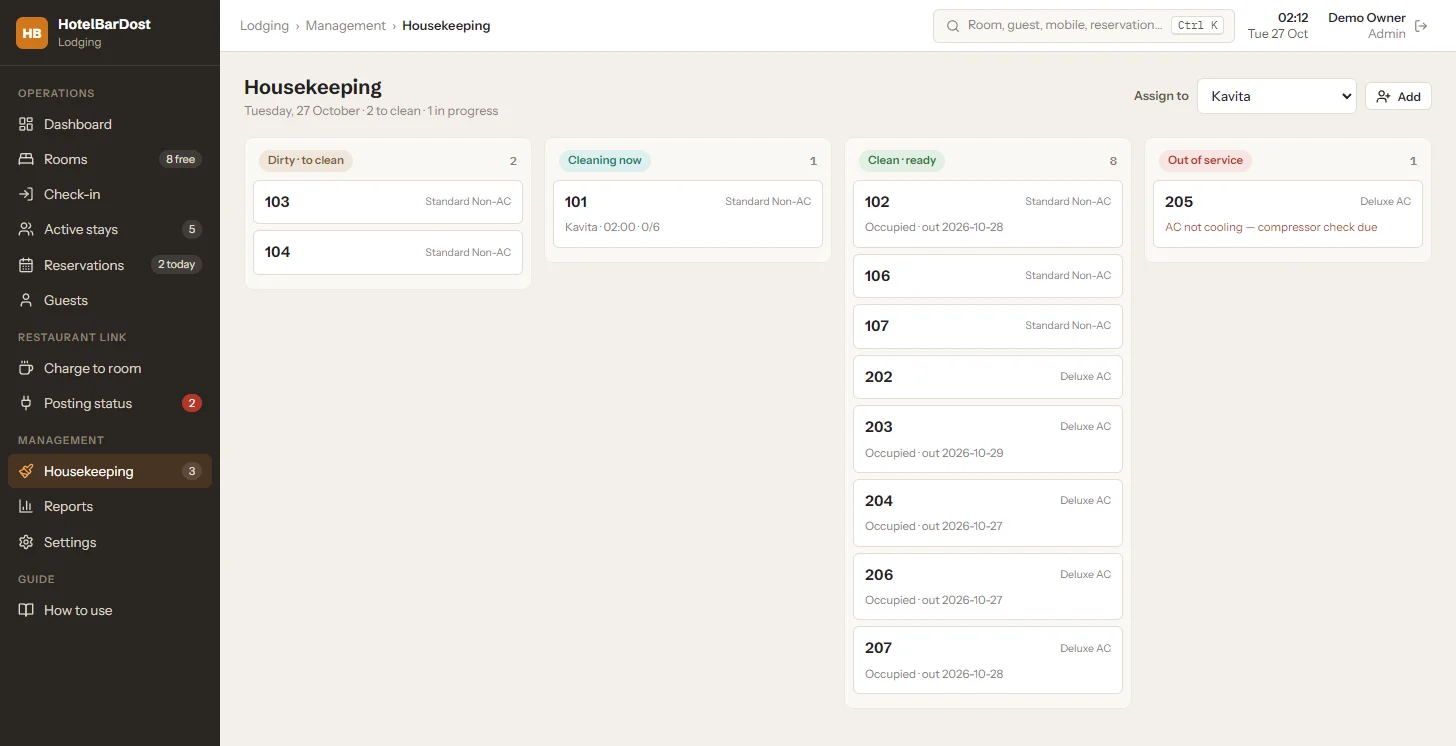
Housekeeping

Know which rooms are ready to sell and who is cleaning what.

  • Board columns: dirty → cleaning → ready, plus out of service
  • Assign rooms to housekeeping staff with a cleaning checklist
  • Out-of-service reasons and maintenance notes per room
  • Night audit opens stay-over cleaning tasks automatically

Tariffs & room types

Set rates once and let each night price itself correctly.

  • Room types with base nightly rates and maximum occupancy
  • Weekend and seasonal rates, named promotions and long-stay discounts
  • Early check-in fee, hourly late-checkout charge and same-day (day-use) stays
  • GST on room rent configurable per property, with a GST-exempt billing option

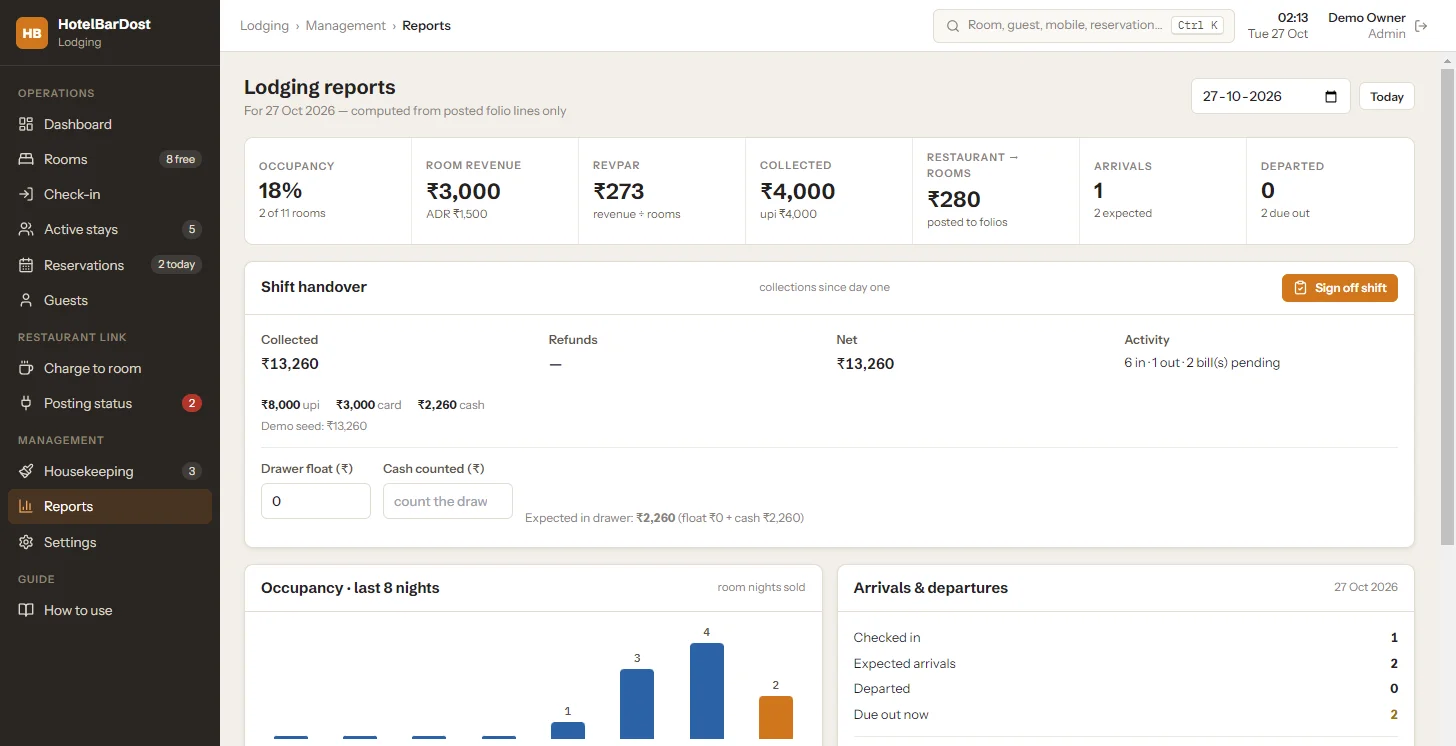
Reports & owner visibility

Figures calculated from posted folio entries — not typed totals.

  • Occupancy, room revenue, ADR and RevPAR for any date
  • Collections by payment method and shift handover with cash count
  • Outstanding balances, guest register and foreign-guest list
  • Monthly GST summary for your CA, with CSV export

Staff control, audit & backups

Runs on your own Windows PC, with every sensitive action on record.

  • PIN sign-in with Admin, Manager, Reception and Housekeeping roles
  • Editable permission matrix; sign-in locks after 5 wrong PINs
  • Audit trail of payments, adjustments, reversals and overrides
  • Works without internet; nightly automatic backup plus one-click backup and restore
A stay, start to finish

From check-in to checkout

Each step below is a real screen in the app. Staff stay in control — nothing is posted or settled without them.

  1. 01Check inCapture the guest's ID, pick a ready room, confirm the tariff and take an advance.
  2. 02Room goes occupiedThe room board updates instantly; the folio opens with the advance recorded.
  3. 03Night auditEach night's room rent and GST post to the folio automatically.
  4. 04Restaurant & bar billsOutlet bills are posted to the guest's room from the Charge-to-room screen.
  5. 05SettleRecord payments in cash, UPI, card or bank transfer — the balance is always visible.
  6. 06Check outReview the final bill, collect the balance, print it, and the room goes to housekeeping.
Check-in & guest records

Guided check-in with ID capture

Take a webcam photo, upload a scan, pair a phone camera by QR, or type the details. Offline OCR and Aadhaar QR reading pre-fill the form; staff confirm the details against the original document before continuing.

  • Aadhaar kept as the last 4 digits only
  • Returning guests found by mobile number, with stay history
  • Walk-ins, reservations, companions and same-day (day-use) stays
Guided check-in
HotelBarDost Lodging guided check-in with webcam, upload, phone scan or manual ID entry
Five-step check-in: ID, guest, room & tariff, review, done
Folios, payments & receipts

One ledger per stay — always the right balance

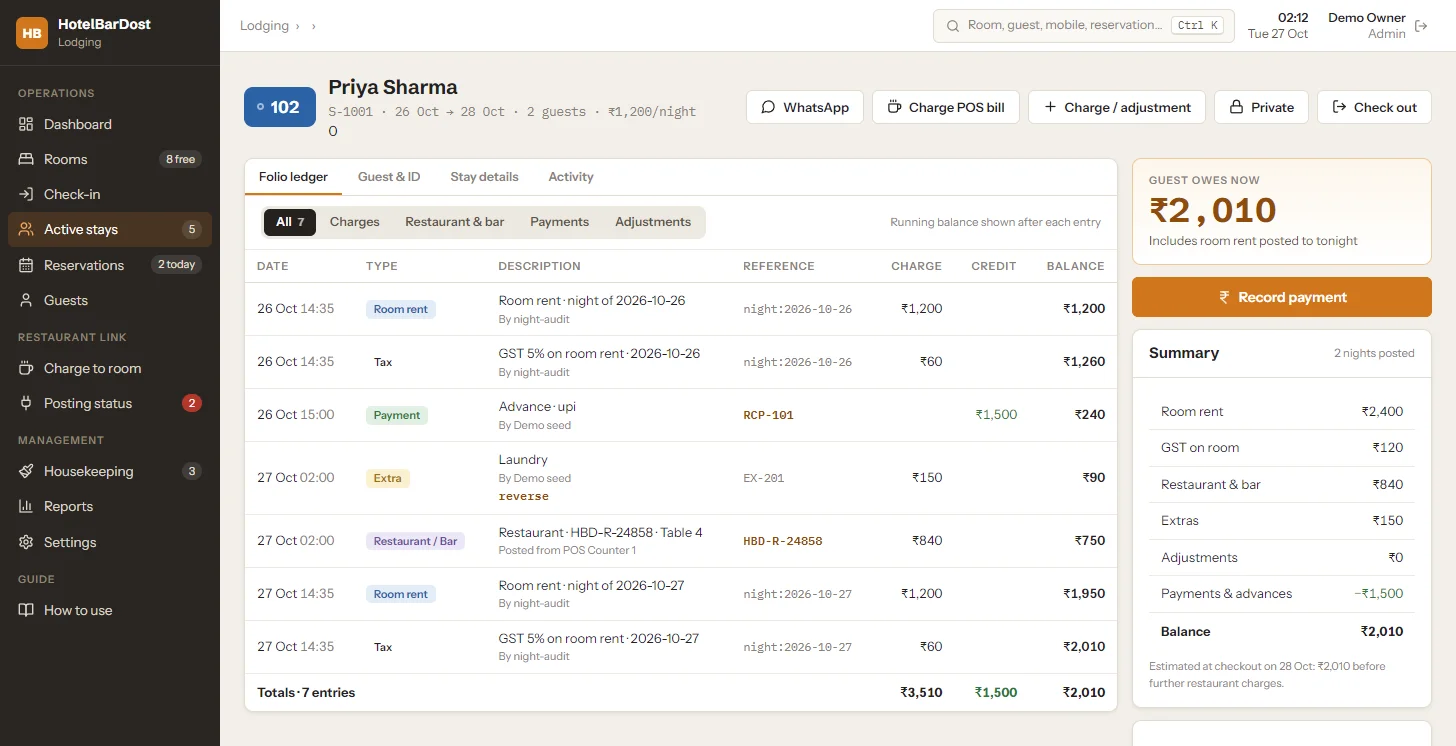
Room rent and GST post every night. Extras, restaurant and bar bills, advances, payments and refunds all land on the same folio, with the running balance shown after every entry.

  • Cash, UPI (with your QR on screen), card and bank transfer
  • Corrections are recorded reversals — entries are never deleted
  • Discounts and adjustments limited to managers, with a reason
Guest folio
HotelBarDost Lodging guest folio ledger with room rent, GST, restaurant charge, payment and running balance
Guest folio with running balance and stay summary (sample data)
Room status & housekeeping

Know which rooms you can sell right now

Checkout sends the room to housekeeping. Staff move it from dirty to cleaning to ready, and the room board updates for the front desk.

  • Assign rooms to housekeeping staff with a checklist
  • Out-of-service rooms with a reason and maintenance notes
  • Night audit opens stay-over cleaning tasks
Housekeeping
HotelBarDost Lodging housekeeping board with dirty, cleaning, ready and out-of-service columns
Housekeeping board: dirty, cleaning, ready, out of service
Checkout & reports

Close the stay, then see the day's numbers

Review the final bill, collect the balance and print it. Reports are calculated from posted folio entries: occupancy, room revenue, ADR, RevPAR, collections by method and outstanding balances.

  • Shift handover with drawer cash count
  • Guest register, foreign-guest list and monthly GST summary for your CA
  • CSV export of reports
Lodging reports
HotelBarDost Lodging reports with occupancy, room revenue, ADR, RevPAR, collections and shift handover
Lodging reports for a selected date (sample data)
Restaurant & bar bills

Charge food and drinks to the guest's room

If your property runs a restaurant, bar or room service, Lodging can carry those bills on the guest's folio so they are settled at checkout.

  • Post a restaurant, bar or room-service bill to an in-house guest's folio from the Lodging Charge-to-room screen
  • Each bill posts at most once — a repeat submission of the same bill cannot double-charge
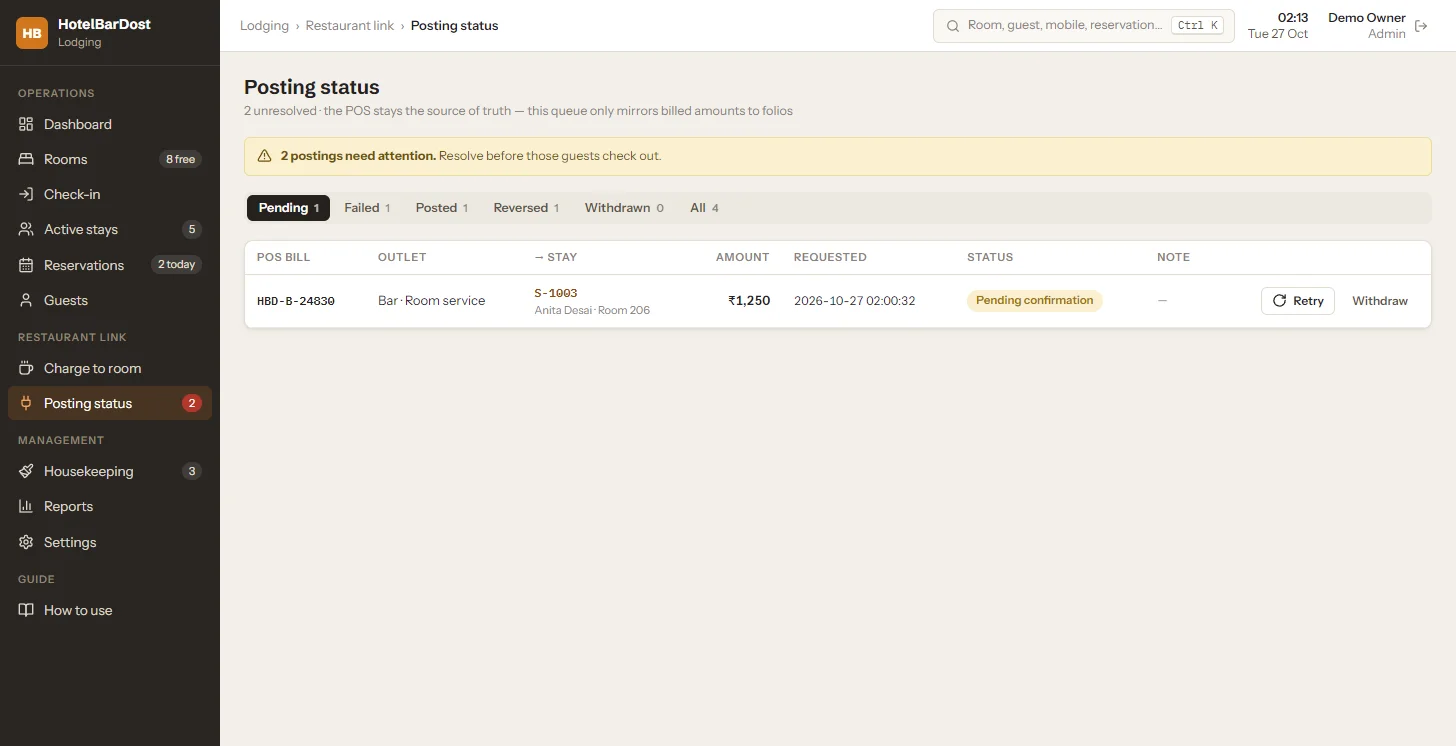
  • Every posting has a visible status: pending, posted, failed, reversed or withdrawn
  • Failed postings can be retried with the same reference; posted charges are reversed with an audit entry, never deleted
  • Checkout warns about unresolved charges until they are resolved or a manager overrides with a reason

How it works today: Today the bill is keyed into Lodging by front-desk staff. A one-click “Charge to Room” button inside HotelBarDost POS, which would send the bill automatically, is not available yet — POS and Lodging currently run as separate applications, each with its own data.

Posting status
HotelBarDost Lodging posting status queue with pending, failed, posted, reversed and withdrawn room charges
Posting status: every room charge is pending, posted, failed, reversed or withdrawn
Pricing

₹18,000 one-time. That's the licence.

One-time licence, machine-bound (one activation per PC). No monthly subscription and no per-bill fees. Running a restaurant or bar too? The Complete package gives you POS and Lodging for ₹30,000 — ₹6,000 less than buying both.

Compare POS only, Lodging only and the Complete package
FeaturePOS onlyLodging onlyComplete (both)
One-time licence price₹18,000₹18,000₹30,000
Bar & restaurant table billing Yes No Yes
Peg-level liquor stock & excise registers Yes No Yes
Room board, check-in & checkout No Yes Yes
Guest folios, payments & receipts No Yes Yes
Housekeeping & reservations No Yes Yes
Restaurant/bar bills on the room folio NoEntered in LodgingEntered in Lodging
Works offline on your Windows PC Yes Yes Yes
Interface languageEnglish & मराठीEnglishPOS: EN & मराठी · Lodging: EN
Annual supportOptional ₹3,000/yearAsk usNot included
Remote Owner ViewOptional ₹4,500/yearOptional ₹4,500/yearOptional ₹4,500/year

Complete package: ₹30,000 instead of ₹36,000 — you save ₹6,000. Annual services are optional, billed separately, and never added to a one-time licence price.

Prices are as published. Ask us for a written quote covering applicable taxes and any hardware before you buy.

Available

HotelBarDost Remote Owner View

₹4,500/year

Optional annual service · separate from every one-time licence

Add Remote Owner View Owner login Ask on WhatsApp

Check the day's business from your phone or laptop, wherever you are — view only, so nobody can bill or change anything remotely.

Status today
Available now as an optional ₹4,500/year service. Your software never depends on it — it keeps billing offline if you stop.
What you see
Today's sales and orders, end-of-day and date-wise sales reports, stock levels, Khata dues and shift details.
For
Customers of HotelBarDost POS, Lodging, the Complete package, Country Counter or Wine — one subscription per software licence. On a multi-outlet setup the franchise remote service is ₹3,500/year per desktop, with every outlet in one login.
Internet
Your software keeps billing offline. The property PC needs an internet connection to send figures, so what you see is as recent as its last update.
Renewal
Yearly and optional. If not renewed, remote viewing stops; your one-time licences and local software are unaffected.

Scope

What Lodging does not do

Better you hear it from us now than find out after buying.

  • No channel manager or OTA sync (Booking.com, MakeMyTrip, Goibibo) and no online booking engine
  • No online payment gateway — payments are recorded at the desk
  • No automatic SMS or WhatsApp sending — staff open a prefilled WhatsApp message themselves
  • One property per installation — no multi-property central dashboard
  • No remote control from outside the property — Remote Owner View (optional) is view only
  • Does not file Form C or police reports — it helps you keep the records
  • No automatic “Charge to Room” from inside HotelBarDost POS yet — outlet bills are entered in Lodging
Setup & support

How you get started

  1. 1. Free installationWe install HotelBarDost Lodging on the front-desk PC for you at no charge — remotely, or on-site anywhere in Maharashtra.
  2. 2. ActivateYour PC shows a machine code; we issue a licence key for that PC. Activation works offline once you have the key.
  3. 3. Set up roomsWe set up your room types, rooms, tariffs and staff PINs with you and train your desk staff — included free.
  4. 4. Get helpPhone and WhatsApp support on 8421470722, 9 AM – 10 PM, in English or Marathi. Ask us about support terms for Lodging.
Lodging FAQ

Questions hotel and lodge owners ask

Straight answers about what HotelBarDost Lodging does today.

HotelBarDost Lodging is Windows software for running the front desk of a hotel or lodge: a room board, guided check-in with ID capture, guest folios, payments, checkout, reservations, housekeeping and reports. It runs on your own PC and works without internet.

₹18,000 one-time. It is a one-time, machine-bound licence (one activation per PC) — no monthly subscription and no per-room or per-booking fee. Ask us what is included for updates, reinstalls and moving to a new PC. Prices are as published. Ask us for a written quote covering applicable taxes and any hardware before you buy.

Yes. Lodging is a separate application with its own licence and its own local database. You can buy and use it on its own.

Yes, from inside Lodging: the Charge-to-room screen posts an outlet bill to an in-house guest's folio, and it appears on the final bill at checkout. The bill is entered at the front desk — an automatic “Charge to Room” button inside HotelBarDost POS is not available yet.

Each bill can be posted only once, so a repeat submission does not create a second charge. A posting that fails is shown as failed in the Posting status screen, where it can be retried or withdrawn. A posted charge is corrected by a reversal entry that stays on the record — nothing is silently deleted.

Staff can take a webcam photo, upload a scan, pair a phone camera by QR code, or type the details. Offline text recognition and Aadhaar QR reading pre-fill the form, and staff tick that they have compared the details with the original document. For Aadhaar, only the last 4 digits are stored.

Not yet. The Lodging screens are in English today. HotelBarDost POS has an English and Marathi interface.

No. Check-in, ID text recognition (OCR), billing, printing, reports and backups all run on the front-desk PC, and the licence is checked offline. The only optional network use is on your own Wi-Fi: pairing a phone camera on the same network to photograph an ID. Data stays in a local database on your PC, backed up automatically every night (the latest 7 are kept); an owner can also back up or restore from Settings. Keep a copy of backups on an external drive too.

No. Lodging has no channel manager, online booking engine or online payment gateway. Reservations are entered at the desk from phone and walk-in bookings. If your property depends on OTA distribution, a cloud PMS with a channel manager may suit you better.

No. Lodging keeps a guest register and can list foreign guests for a date to help you prepare your report, but it does not submit anything to any authority. Filing Form C and meeting local registration rules remain the property's responsibility.

Yes, with Remote Owner View — an optional ₹4,500/year per software licence service you can add to Lodging, POS, the Complete package or Country Counter. It is view only, and the front-desk PC keeps working offline without it.

Use the demo form on this page, or call or WhatsApp 8421470722 (9 AM – 10 PM). We'll show you check-in, the folio and checkout on a live screen.

Still have questions?

We're happy to walk you through HotelBarDost Lodging and answer anything specific to your hotel or lodge.

  • One-time licence
  • Live screen demo
  • Phone & WhatsApp support
Lodging demo

See Lodging on a live screen

We'll walk you through the room board, a check-in, the guest folio and checkout — and answer questions about your property.

We use these details only to contact you about your enquiry — see our Privacy Policy.

HotelBarDost Lodging

Replace the register book with a room board

₹18,000 one-time licence. Works offline on your own PC.

  • One-time licence
  • Works without internet
  • Your data stays on your PC
Book a Demo WhatsApp